Friday, 12 February 2021

Generics and Collections

Java Generics and Collections

Collections are about how to store and manage elements in a data structure. It includes List, Set, Queue, and Map. Generics is about how to maintain element type in collections to be type-safe.  That is the reason why these two topics are always staying together. 

Generics

Java generics are introduced from Java 5. The purpose of using generics is to enable you to mark your intent of using a class, method, or interface with a particular data type. Generics add compile-time safety to collections. By this way, a type inconsistency may be found in an early time, rather than in the run time. Generics can be applied to a class, an interface, a method, and even a constructor. They are called generic classes, generic interface, generic methods, or generic constructors.

The key for Generics is to declare type parameters, it is a placeholder that is replaced by an actual type in the compiling time. For an instance, List<String> is a parameterised type, which stands for a list that contains String alone, then the instance must host String alone, i.e new ArrayList<String>(). 

Generic type parameter declaration 

Type parameter follows a naming convention, i.e. <T>, a single capital character.  Type parameters can be declared with a class, a constructor, an interface, or a method.   

For a generic class/interface, it declares its generic types parameter just after its class/interface name;
For a generic method,  it declares its own type parameter just after the access modifier before its return type.  This is important, for otherwise, the compiler may don't know what return type it is.

Type argument → Type parameter; when compiling using actual type to replace the type parameter.
The compiler may replace type parameters using actual types presented in generic type argument, or infer it from the real data types.

For class(interface) generics: a type parameter is inferred from a parameterised type, like new List<Integer> ints = ArrayList<>(); 

For method generics: type parameter is inferred from the real data type, from the input arguments or returned value type; 

Type erasure in the runtime

After compilation, the generic type will be replaced by an Object type or its generic boundary class type. The compiler generates a single version of a compiled class file for the generic class/interface, but not one for a generic class or one for a raw class. So during the runtime, there are no generic types. Java Generics is a compiling time check, to verify the object types are consistent in the collection as we intend to. 

Bounded generic types

The purpose is to restrict types that can be used as a type-argument by putting a boundary.  
A type parameter can have multiple boundary types, i.e. one class type and many interface types. It means that a type-argument must satisfy all types of constraints.

Upper-bounded generic type: 
<T extends Number>: meaning that type argument is a subtype of Number type.

Lower-bounded generic type: 
<T super Number>: meaning that type argument is a supertype of Number type. 


A generic class can extend another generic class or interface. 

A generic class may extend from another generic class, but it must pass a type argument to the type parameter of its base class. Otherwise, it won't be compiled.

Class ArrayList<E> implements List<E>
The type parameter E is passed to its base class as a type argument.

The inheritance doesn't apply to generic arguments. 

A rule: Reference generic type must be identical to the instance generic type. 

List<Object> objects = new ArrayList<Integer>(); 

Although ArrayList is-a List, and therefore an ArrayList instance can be assigned to a List reference variable.  However, this concept doesn't work with generic arguments.  The above won't compile. 

I think the reason because this violates the purpose of the generics, checking the consistency of the element types.

List<Object> objects = new ArrayList<Object>(); 
//the above compile correclty.

Non-generic class or interface extends from a generic class

A non-generic class can extend another generic class. However, it needs to pass type argument(a type of instance)  to its base class.
class Parcel<T> {}
class NonGenericPhoneParcel extends Parcel<Phone>{}

A non-generic class can implement a generic interface by replacing its type parameters with actual types. The same as the above

Using wildcard

A wildcard(?) type parameter stands for any object types, or say a unknow type. A wildcard type parameter can be constrained by an upper boundary or a lower boundary.

List<?> list = new ArrayList<String>(); //this is valid
List<Object> list = new ArrayList<String>()//this is not valid. must be identical. 
So the wildcard stands for any type of objects alone.

Adding objects to a wildcard defined collection is not allowed.
List<?> list = new ArrayList<String>(); //this is valid
list.add(new Book()); //this won't complile

The above List<?> accepts any type of objects; Compiler, therefore, cannot make sure of type consistency. So it simply prevents it from compiling.  However, if we use it as a method argument, then it gives a sort of flexibility to accept a group of object types, meanwhile, you get a data consistency protection because in the method the wild card collection cannot be modified. 

Using a wildcard as a method argument

void method(List<?> list){
//you can traverse all elements of input list.
list.forEach(System.out::println);
//but you cannot add element to it.
list.add(new Object())//compiling error here
}

However, you lose the possibility to add a new element within the method; it will cause a compilation error. 

Upper-bounded wildcard

For upper-bounded wildcard, you can read over the collection, but you cannot add an element. The problem is because an upper-bounded wildcard is open for all sub-types of the upper bound, so compiler prevents adding a new element. 

List<? extends Gift> list = new List<Gift>(); //valid; 
List<? extends Gift> list = new List<Book>();//valid
List<? extends Gift> list = new List<Follower>();//valid

However, you cannot add a new element in the lists mentioned above; it causes compilation errors. 
It is good for the method input argument, which makes the method accepts a group of object types. 

void method(List<? extends Number> list){
list.forEach(System.out::println);
}

Lower-bounded wildcard

For lower-bounded wildcard, you can add a new element, i.e. boundary type and its subtypes; you can loop over each element, but via Object type.  Actually, it sounds weird. 

<? super Type> a supertype of a class type, including the boundary.
List<? super Gift> list = new ArrayList<Gift>();
List<? super Gift> list = new ArrayList<Object>()

You can add new element Gift type and its subtypes. 

for(Object gift:list){}

List<? super Gift> list; read as Object, add Gift and its subtypes. 


Collection

The collection is a data structure, to hold a group of objects(elements); and data structure functionalities, like add, insert, remove, sorting, etc.

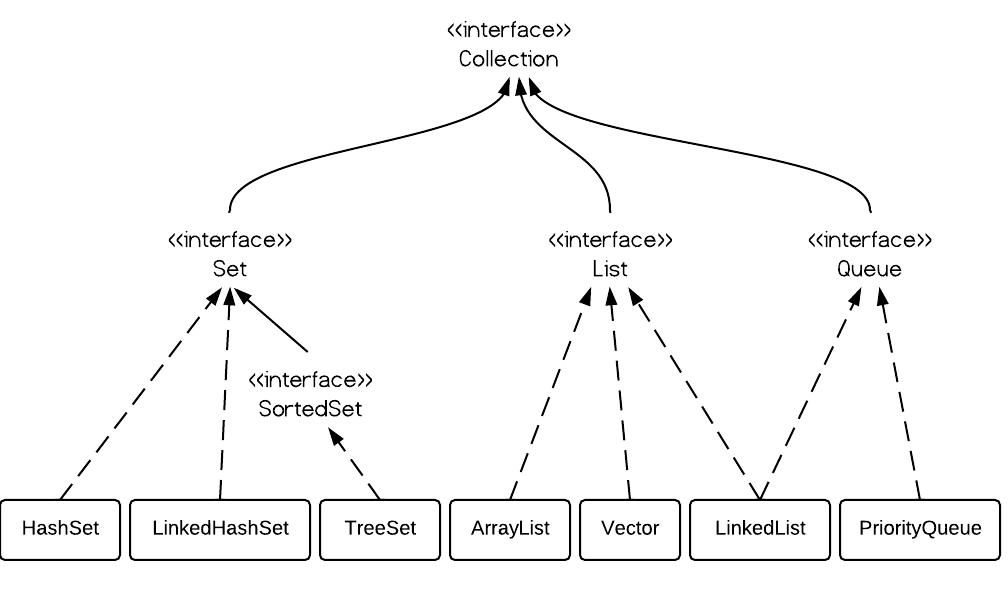
Set, List and Queue Interface extends from Collection Interface extends Iterable Interface. Therefore, Set, List and Queue are both collections and iterable. The map doesn't implement Collection interface, but it is a part of java Collection and considered as a kind of Collection.

Set maintains a collection of unique elements.
List maintains a collection of elements, may be duplicated.

Concrete implementations:
Set: HashSet(not ordered, sorted by hashcode), LinkedHashSet(ordered), and TreeSet(sorted by comparable)
List: ArrayList(ordered) and LinkedList(ordered)
Queue: LinkedList(ordered) (LinkedList implements Queue interface)

Ordered: retrieving elements in order as they are added. All lists are ordered, but not HashSet and TreeSet. When needing an ordered set, then implementing LinkedHashSet. It is internally implemented as a linked list.

Sorted:  elements are sorted, and they may need to implement Comparable interface, like TreeSet. Otherwise, the client has to provide a comparator as instantiating it. Please note: HashSet is implemented as HashMap, it was sorted by the hash code of an element, which is translated into an index number used as a key value of the map. That is why HashSet has no guarantee of order but sorted by the hashcode.

ArrayList supports random access, for internally it is implemented by an Array so that it supports accessing element directly by array indexing.  LinkedList supports sequence access, for underlying, it implemented a double-linked list, each node(holding the elements)  contains pointers pointing to the previous element and next element. When accessing one of the elements of LinkedList, it has to traverse from the head to the tail, until finding a matched element.

HashSet retrieving uses hashcode, in some sense it is a kind of indexing, but invoking hashcode-index calculation, and when more than one elements sharing the same index, it may invoke equals method to locate the element. 

TreeSet →NavigableSet→SortedSet→Set
TreeSet is sorted in natural order, or by an external custom comparator. TreeSet offers navigable and sorted APIs. 

ArrayList vs LinkedList:
ArrayList is internally implemented as an array, so it supports random accessing. However, its array size is not mutable, it needs frequently re-instantiate a new array according to current array size and capacity factor, and also resulting in extra unused memory space. In a linked list, this can be easily by reset the node previous and next pointer.

LinkedList →Dequeue→Queue 
LinkedList implements Deque that implements Queue. LinkedList is, therefore, be used to implement Queue and Stack. 

PriorityQueue  → Queue
The purpose of PriorityQueue is First priority first out. PriorityQueue is sorted according to element natural order or an external comparator. 

From the view of insertion and removal, the linked list gives much better performance for implementing a Queue. It doesn't need to swap the buckets but simply cutting off a pointer and re-pointing to a new bucket.   


Map

The map is packaged within the collections.  The Map is an interface. It is a type of collection, although it doesn't implement the Collection interface. 

HashMap: 

The Map is ordered by the key hashcode, which is translated into an Index pointing to one bucket of the map. So the Map will rearrange the order of the elements.

boolean containsKey(key)
boolean containsValue(value)
V get(Object key): get value from its key
Set<K> keySet();
Collection<V> values(); return a collection of values
remove(key)
clear()
putAll(Map<? extends k, ? extends v> map)

LinkedHashMap: (ordered)

keeping insertion order. 

TreeMap 

TreeMap implements the NavigableMap interface, which extends the SortedMap interface. TreeMap is sorted in its natural order(implemented Comparable interface), or sorted according to any external custom comparator in many ways.

SortedMap 

SortedMap is an interface, offering APIs taking use of sorted elements; for instance, you may easily Finding the min. and max. from a sorted map. 
K firstKey();
K lastKey(); 

Copying a portion of Map from fromKey(included) and toKey(excluded).
SortedMap<K, V> subMap(K fromKey, K toKey):  >=fromKey AND <toKey

Copying a portion of Map,  whose keys are strictly less toKey
SortedMap<K,V> headMap(K to): <

Copying a portion of Map from the tail, whose keys are strictly greater than fromKey
SortedMap<K,V> tailMap(K from): >


NavigableMap offers APIs to search key-value, like  lower(), floor(), higher(), and ceiling() 
lowerKey(Key): < key
floorKey(Key): <=key
higherLey(Key): > key
ceilingKey(Key): >=key

descendingMap(): returns a NavigatbleMap in a reverse order

pollFirstEntry(): return and remove the first entry.
pollLastEntry(): return and remove the last entry.


Friday, 22 January 2021

Disable SpringBoot Data-Source Auto-Config

 package com.ynz.finance.pricetrend;


import org.springframework.boot.SpringApplication;
import org.springframework.boot.autoconfigure.SpringBootApplication;
import org.springframework.boot.autoconfigure.jdbc.DataSourceAutoConfiguration;
import org.springframework.boot.autoconfigure.jdbc.DataSourceTransactionManagerAutoConfiguration;
import org.springframework.boot.autoconfigure.orm.jpa.HibernateJpaAutoConfiguration;

@SpringBootApplication(exclude = {
DataSourceAutoConfiguration.class,
DataSourceTransactionManagerAutoConfiguration.class,
HibernateJpaAutoConfiguration.class
})
public class FindAllNasdaq233DayAveragePrices {

public static void main(String[] args) {
SpringApplication.run(FindAllNasdaq233DayAveragePrices.class, args);
}

}

Caused by: java.awt.HeadlessException

The error happens as Integrating SpringBoot application with JavaFX application; 

what does headless mean? 

Headless software (e.g. "headless Java" or "headless Linux",) is software capable of working on a device without a graphical user interface. ... 


solution: 

SpringApplicationBuilder builder = new SpringApplicationBuilder(DemoApplication.class);
builder.headless(false);
applicationContext = builder.run();

SpringApplicationBuilder vs SpringApplication

Both are used to bootstrap a Spring boot application context. What difference between them? 

SpringApplication

SpringApplication is a class to bootstrap a Spring application from a Java main method. It creates an appropriate ApplicationContext instance (depending on the classpath), registers a CommandLinePropertySource to expose command line arguments as Spring properties, refreshes the application context, loading all singleton beans, and triggers any CommandLineRunner beans.


SpringApplicationBuilder

SpringApplicationBuilder is a builder for SpringApplication and ApplicationContext instances with convenient fluent API and context hierarchy support.


SpringApplication do more than SpringApplicationBuilder


Regular expressions


A regular expression (regex) is a language, for it has a syntax.  It is used to describe a pattern among characters, therefore it may simplify the process to parse a string or a text. You may parse once rather than repeating the process many times.

Character Classes 
The term refers to a set of characters that you can enclose within square brackets, for instance [sz]; it used to specify one of the set may be matched, or say it is a pattern that needs to be checked.

Class type: 
Simple [agfd]  match exactly one from a, g, f or d
Range [a-f0-7] match one from the range a to f (both included) or 0-7(both included)
Negation [^123k-m] matches exactly one character that is not 1 2 or from the range k to m (both included)

Predefined Character Classes
Java's regex engine supports predefined character classes for your convenience.

\d : a digit [0-9]
\D : a non-digit[^0-9]
\s : a white space [\t (tab), \n (new line), space, \x0B(end of line), \f(form feed), \r(carriage)]
\S: a non-white space [^\s]
\w: a word character: [a-zA-Z0-9]
\W: a nonword character: [^\w]
\t: tab
\n: a new line
. : wildcard matching any character.

Boundary Matcher
^: matching the beginning of a line. fx: ^dog$. it means a line contains a single word 'dog'
$: matching the end of a line.
\b: a word boundary  fx: \bdog\b    dog  an exact word dog is matched
\B: a non-word boundary  fx: \bdog\B   within doggie dog is matched

Quantifier
X? : matching X  0 or 1 time
X+: matching X 1 or many times
X*: matching X 0 or many times
X{3}: matching exactly 3 times
X{1,3}: matching X 1 to 3 times

Logic
X|Y: logic OR; matching X or Y
XY: X pattern followed by the Pattern Y
(X): capturing as a group. 


Friday, 15 January 2021

Using platform encoding (UTF-8 actually) to copy filtered resources, i.e. build is platform dependent!

 How to prevent the warning message? 

This or a similar warning is emitted by a plugin that processes plain text files but has not been configured to use a specific file encoding. So eliminating the warning is simply a matter of finding out which plugin emits it and how to configure the file encoding for it. This is as easy as adding the following property to your POM (or one of its parent POMs):


  1. <project>
  2. ...
  3. <properties>
  4. <project.build.sourceEncoding>UTF-8</project.build.sourceEncoding>
  5. </properties>
  6. ...
  7. </project>


Monday, 11 January 2021

Understanding Spring and Config It

Spring Framework

Spring is built on the top of JEE. It re-manage the usage of JEE API and releasing developers from some trivial works.

Init a minimal spring project that needs the following major dependencies: 
spring-context: defines the actual Spring Injection Container and has a small number of dependencies: spring-core, spring-expression, spring-Aop, and spring-beans.
spring-core: is the core framework that provides the container required to implement Dependency Injection and inversion of control.

Application context:

ApplicationContext is a sub-interface of BeanFactory; so it is also a BeanFactory. In addition, it needs to know some concepts, Inversion of Control(IOC) and IOC container, Dependency Injection(DI),  and bean metadata.  The concept of IOC is about who is going to drive the car; driving yourself, or hiring a driver driving for you. That is the inversion of control. In another word in the software, who is going to inject the dependencies; injecting yourself, or leaving a container injecting for you. We leave the controls of creating an instance and its dependencies to a container, so as to dissolve client code from coupling with the underlying dependencies. 

The application context acts as the heart of the Spring framework. It encapsulates the bean factory,  and loading bean metadata externally for bean creation;  it provides a mechanism for the creation of beans in the correct order, meanwhile providing all beans dependency injections;  beans are created as the application startup, and managed in an IOC container ready for providing bean reference when the code request for it.

Developers mainly config IOC container and leaving bean creations to the container. By this way, it decouples class dependencies and leaving all of these couplings within the container. We use a kind of metadata or whatever it is called to tell the IOC container which beans are needed and their dependencies, just like a blueprint that depicts how an instance is created.  For the client-side code, it uses the @Autowire to request IOC container at the point it needs an instance reference. It means that the IOC container needs to provide the instance reference and assemble its all dependencies, i.e. it is also called Dependency Injection(DI)


DI and IOC container:  

Injection means that at a point that the code needs to refer to an instance, it requests the container and achieves its reference. All DI is handled by the bean factory, which is in charge of figuring bean dependencies, and in charge of assembling all these beans together and return the root reference to the client.  

IOC container manages dependent classes and their instances in a graph. It wires all class dependencies once and re-uses it as any point.  It, therefore, reducing a lot of repeated work and removes the coupling of classes from the client code.

DI and IOC are carried by two Spring packages, i.e. Spring core and Spring context. At a minimum, if you include these two packages in your project, then you may implement DI.

Configuring Application Context

Configuring Spring differently for different deployments, which may include different beans, different properties, different databases etc.

We looked at multiple ways of activating profiles. Let's now see which one has priority over the other and what happens if you use more than one, from highest to lowest priority:

  1. Context parameter in web.xml
  2. WebApplicationInitializer
  3. JVM system parameter
  4. Environment variable
  5. Maven profile 

Profiles:

@Profile is applied with @Configuration or individual bean method level.

@Profile("!dev")
@Bean

Spring Core Property together,  i.e. spring.profiles.active = 'dev', indicates that the 'dev' profile is activated. It realises that the configurations, beans, or properties can be switched according to the activated profile.

It is able to activate a @Profile externally during application start-up.

JVM system parameter:
-Dspring.profiles.active=dev

Program argument:
spring.profiles.active=dev

Environment variable:
in UNIX: export spring_profile_active=dev
or in IDE edit Configurations: set Environment variable; spring.profiles.active=dev

Application property file:
spring.profiles.active=dev

Command line parameter:
java -jar any.jar --spring.profiles.active=dev

Spring profile can be activated via Maven profiles, by specifying spring.profiles.active configuration property.

ref. to https://www.baeldung.com/spring-profiles

Using @ActiveProfile in Tests, making it easy to specify what profiles active.

Value injection: 
@Value is used for injecting property into the code. It is used in the fields or method arguments.
It may inject a value object from a property file or system or environment variables.

Spring expression language(SpEL) 

SpEL is an expression language that supports querying and manipulating an object graph at runtime. It is a single well supported within the Spring community, but it is self-contained and can be used independently. SpEL supports calling methods, accessing properties, and calling constructors.

We often use SpEL for Annotation Configuration; like putting a default value on fields, methods, and method or constructor parameters. 
@Value("#{new Boolean(environment['spring.profiles.active']!='dev')}")
private boolean is24Hours;
Spel can do a logic operation, may be helpful.

https://docs.spring.io/spring-framework/docs/current/reference/html/core.html#expressions

Proxies

Proxy is a pattern, it is used to add behaviours to classes. Spring uses a lot of proxies to add aspected behaviours, for instance, transaction boundaries, security check,  logging, cache etc.  

Spring uses both JDK and CGLib-based proxies in its operations. JDK uses an interface to generate a proxy class in order to wrap the target class, but CGLib extends directly from the target class and overriding the point-cut. 

Bean Scopes

Bean scopes are critical concepts for understanding Spring in depth.

  • Singleton:  By default, all classes decorated by @Component are instantiated as a singleton, namely one instance per spring application context.  It needs to watch out states shared across the user of the bean.
  • Prototype;  Bean definition stored in IOC;  new instance every time it is referred. The definition is stored in IOC.
  • Session: It applies to web environment only. Session scope means one instance of a bean per user session.  Definition of the bean is stored in an IOC container when a session is created, the bean is created.
  • Request:  It applies to web environment only. Within a user session, the user may trigger several HTTP requests. A request scoped bean has a life cycle as the request where it is spawned.

Component Scanning

There are three ways to provide bean factory blueprints, i.e. an XML file, Java-based config, or Component scanning. Today, component scanning is the favourite for defining bean metadata. 

Component scanning(@ComponentScan) scans a base package(com.xxx.xxx) and load classes decorated by @Component or its derivatives(@Service, @Repository, etc) into the bean factory.  @ComponentScan without arguments tells Spring to scan the current package and all of its sub-packages.

Using @ComponentScan annotation along with @Configuration annotation together may bring Java-based blueprints and Component scanning metadata together to BeanFactory via an ApplicationContext.

In SpringBoot, using @SpringBootApplicatoin includes the component scanning by default. @ComponentScan(basePackages="xxx.zzz.yyy") defines the entry to scan for components.  Properties file can be scanned and loaded @PropertySource("classpath: application. properties"), it externally defines a location of customer property files

In a component scanning process, it builds up the dependency graph automatically according to component dependencies,  also called Dependency Injection(DI). From the client-side of beans, it is referred to as an auto-wiring process using @Autowired annotation at the point that the code needs the reference of the instance. IOC container and DI build up bean graph for clients and can be reused many times afterwards. This is a big saving. 

Using @Qualifier or @Primary to solve type ambiguity, because of one type having more than one implementation.

Component scanning is also used with conditional configuration.

Lifecycle methods: 

Leveraging JSR-250, not Spring specific. 

Post Construction (@PostConstruct) means to do something before a bean become use phase. It must be a void method without arguments. It is called after property setting is completed. it is used to init.

Pre Destroy(@PreDestroy) means to do something before the application context closes. The method is called before the application context is about to remove the bean. The method may be used to close the opened resources.

Both of them not included after java 9. 


Bean Life Cycles

There are three phases, initialization, use(interacting with Spring IOC container), and deconstruction. The most time of life cycle is spent during the use phase; the most complicated phase is the initialization, and deconstruction is the end of the life cycle. The following diagram illustrates the initialization. It begins with the creation of the application context and follows up with the bean factory initialization phase and bean initialization and instantiation. It is a phase we can impact the behaviour of application most. 

Init phase:  creating of App context => bean factory initialization phase=>bean initialization and instantiation

Load bean definitions: 

Bean definition loaded: 

The first step loading bean definition into the bean factory from all sources:
  1. Java configuration(@Configuration,@Bean,@Value, @DependsOn,@Import)
  2. XML configuration; not often used now. 
  3. Component scanning and auto-configuration. (@ComponentScan,@Component)
You can do all of them, but the best is to pick up one and stick with it.  The bean definition (class metadata); at the point, has been loaded, and instance references are created, however, instances have not been created. It is import to know that at this phase there is no bean having been instantiated.  At this phase, the bean factory contains bean metadata. and bean references.

Post-process bean definitions:

BeanFactory Post-Processors: Before bean instantiation, and after bean definition loading. This phase allows modifying any bean in the factory prior to instantiation. One of the most familiar examples of this is the  PropertySourcesPlaceholderConfigurer. 

Bean postprocess is the first extension point, allowing to impact bean factory. You can extend from the BeanFactoryPostProcessor to write a custom code to do something to beans or a subset of beans. 
It is not common to write your won, but it is good to understand you can use this to your advantage. It is very common to use existing ones(registering scope, properties)

Bean factory post-processors(BFPP) and bean definitions must be static; removing risks of side effects of dynamic instances.

At the end of this stage, the bean factory is loaded with references; the bean factory and all beans are configured; all system-level work is completed in Spring; It is ready for the next stage. 

Instantiation phase: 

for each bean Bean factory need to do: 

Construction

Beans are instantiated using constructors; Done in the correct order to ensure dependencies are created first; Creating only singletons at this  point, anything other than a singleton bean will not be constructed because they are prototype or session beans;

Eager vs. Lazy
By default, all beans are instantiated eagerly. To truly be lazy, there can be nothing that depends on them. Even you label a bean as a lazy bean, the application context reserve the right to ignore.

At the end of this phase, bean reference is still kept inside the Bean Factory; instances have been constructed, but not ready for use yet.

Setters:

post-initialization DI should only be done on optional beans or dynamic beans.
Autowiring occurs(non-constructor based)

This is another chance to auto-wire after beans having been instantiated.  Autowiring occurs on setters with @Autowired  annotation. 

At the end of this phase, all dependencies are injected, beans are fully initialized, but still not ready for use.

Bean post-processor(pre-initializer)

This is the final point of configuration manipulation. each bean may have additional behaviours added at this point; the bean post-processing event. there are two types of extensible and generic processing: before and after initializer.

Initializer: 
This is the second BeanPostProcessor action. @PostConstruct methods called here.

many other things happen during this initializer phase. 

BeanPostProcessor Interface
The bean post-processor interface is used for pre or post initializer steps. The BeanPostProcessor interface allows you to inject common behaviour to a "class" of beans. It still operates on specific beans.  The framework leverages lots of these, a lot of proxies are built during this pre-phase especially.  


Bean post-processor(Post-init)
at the end of this phase, beans have been instantiated and initialized.
Dependencies have been injected.
Beans are finally ready for use.

Use phase:

Most time is spent in this phase; ApplicationContext serves proxies to the original class; ApplicationContext maintains handle to each bean(singleton)

context-aware beans
Spring provides interface ApplicationContextAware; gives your class a handle to the ApplicationContext; not a very common interface to use, but is available during the use phase.
Actually, the context-aware beans get an application context reference injected.

https://dzone.com/articles/spring-bean-lifecycle-using-spring-aware-interface


Destruction phase:

When close is called on the ApplicationContext, the destruction phase of the life cycle begins, and it is a one-way door. Any @PreDestroy method is called at this point, in which beans are not destroyed, but only destroyed by GC.


Aspect-Oriented Programming

An Aspect stands for a cutting concern across many classes, and it is important to know AOP change your code behaviour in the runtime, only in the runtime. 

AOP is for reusing code on a cutting-cross concern, fx: logging, transaction management, caching, security, checking method performance, handling common exceptions etc. AOP programming is an easy way of applying the same code in many classes, to extend or modify its existing method's behaviour. 

In Spring, AOP is implemented by a JDK dynamic proxy(AspectJ) or a CGLIB proxy(inheritance).  AOP is implemented as a proxy pattern or OOP inheritance. 

Dependencies: 
spring-core, spring-context, and aspectjweaver 

Concept and Terms:

In the Spring, basically, AOP concept/terms/annotations have one to one mapping relationship; exactly understanding terms help to implement AOP in the code.  
  • Primary concern: business logic
  • Secondary concern: a supportive function. 
  • Weaving: linking Aspect with other application types or objects to create an advised object. 
  • Target object: object being advised by one or more aspect; referred to as the advised object. 
  • Joinpoint: a spot in your BL code, where a cutting concern code can be applied there.
  • Pointcut: selecting a joint point to apply a common-concern code that matches join points. 
  • Aspect: a concern that cuts across multiple class. 
  • Advice: an implementation of Aspect. the code to solve the cutting concerns
  • AOP proxy: a proxied target created by the AOP framework, to carry out the Advice.
The major points as Implementing an AOP: 
You need to define JoinPoint and then using PointCut to select the JoinPoint, Afterwards implementing the cutting concern code in an Advice. 


Pointcut syntax:

designator("r p.c.m(arg)") 
r:return type; 
p:package; 
c: class; 
m: method; 
arg:args

Supported Pointcut Designators

Spring AOP supports the following AspectJ pointcut designators (PCD) for use in pointcut expressions:

execution: For matching method execution join points. This is the primary pointcut designator to use when working with Spring AOP.

within: Limits matching to join points within certain types (the execution of a method declared within a matching type when using Spring AOP).

this: Limits matching to join points (the execution of methods when using Spring AOP) where the bean reference (Spring AOP proxy) is an instance of the given type.

target: Limits matching to join points (the execution of methods when using Spring AOP) where the target object (application object being proxied) is an instance of the given type.

args: Limits matching to join points (the execution of methods when using Spring AOP) where the arguments are instances of the given types.

@target: Limits matching to join points (the execution of methods when using Spring AOP) where the class of the executing object has an annotation of the given type.

@args: Limits matching to join points (the execution of methods when using Spring AOP) where the runtime type of the actual arguments passed have annotations of the given types.

@within: Limits matching to join points within types that have the given annotation (the execution of methods declared in types with the given annotation when using Spring AOP).

@annotation: Limits matching to join points where the subject of the join point (the method being run in Spring AOP) has the given annotation.


You need to enable AOP @EnableAspectJAutoProxy
Enables support for handling components marked with AspectJ's @Aspect annotation, similar to the functionality found in Spring's <aop:aspectj-autoproxy> XML element. To be used on @Configuration classes 

Using @Aspect to define an Aspect, but must together with a @Component, so that @Component can detect it. 

Type of Advice:

  • Before advice:  advice executed before a joint point.
  • After returning advice: Advice to be executed after a join point completes normally.
  • After throwing advice: Advice to be executed if a method exits by throwing an exception.
  • After(finally)  advice: Advice to be executed regardless of means by which a join point exits(normal or exceptional return).
  • Around advice:  performing custom behaviour before and after the joinpoint.

Can Jackson Deserialize Java Time ZonedDateTime

Yes, but must include JSR310. Thus ZonedDateTime can be deserialized directly from JSON response to POJO field. <dependency> <g...