Showing posts with label OCPJP. Show all posts

Friday, 14 April 2023

Concurrent Programming Review

Process and Thread


The process is self-contained. It doesn't share the resource with others. A thread is a minimal execution unit, living inside a process. One process may consist of many threads. Threads may share a common resource with each other.

Volatile: Solving the visibility issue between threads.

Each Thread has its own local cache, so the variable defined in a thread won't be visible by another thread. When using Volatile keyword to modify a variable, the OS will push the variable into the shared cache(among the threads), thus it becomes visible to all other threads.

Volatile provides visibilities between isolated threads, however it doesn't provide an atomic protection from multiple step operation(read-modification-write).

Concurrent and Parallel computing 

Concurrent computing task can be decomposed into sub-tasks, which are order-independent.  These sub-tasks are carried out at the same core but different threads. Form an external view, it seems that these tasks are carried out simultaneously, but actually not.

Parallel computing needs parallel computing hardware first, i.e. having more than one core. The computing task is carried out in independent cores simultaneously.  

Mutex

Mutex means mutual exclusion is the way to solve the data race. At any time, only one thread is allowed to access the shared data. 

Data race: 

Simultaneously multiple threads access a common memory location.  The data stored there may be not consistent and being polluted. Ideally,  all steps should be carried out in a single uninterruptible operation, so as to prevent data from pollution. 

Lock: 

Two types of locks, i.e. extrinsic or intrinsic lock.

An extrinsic lock is explicitly declared from Lock interface and its implementations. A critical section is protected by an explicit lock and afterwards, the lock is unlocked.

Synchronization: 

Two types of synchronization, i.e. synchronization method or synchronization statements.

Every Java class or object has an intrinsic lock associated with it. The intrinsic lock must be achieved first, so as to access the synchronized method or statements.

Note: ➀watching out Synchronizing on the class or instance; ➁ don't synchronize on an immutable object, for it generates a new instance after its value being modified.

Atomic variables:

The most commonly used atomic variable classes in Java are AtomicInteger, AtomicLong, AtomicBoolean, and AtomicReference. These classes represent an int, long, boolean and object reference respectively which can be atomically updated.

For instance, AtomicInteger provides a method incrementAndGet(), it is not synchronized, but it offers
atomicity guarantees by using Low-level compare-and-set(CAS) instruction. 

Try Lock:

The tryLock method offers a non-blocking way to acquire the lock(explicit lock), so as to improve performance.

When a thread wants to acquire the lock, but not available, it may go away to carry out some other tasks, rather than being blocked and waiting there. This is the purpose to have 'try lock' method.

Read-write lock:

Instead of locking the resource to both read and write operations equally. A read-write lock is distinguished into a two-part lock, i.e. a read-alone lock and a write-alone lock. By this way, it may improve the performance. By this way, it allows multiple threads to read the shared resources simultaneously, for reading doesn't cause data race. It allows a single thread to write on the shared resource at a moment. This type of lock may be used when the number of reading threads is much bigger than the number of writing thread.

Note: read-write lock may use more resource under the hood.

Liveness


Deadlock:

Resource A and its Lock A; Resource B and its Lock B. Thread A hold Lock A, while Thread b hold Lock B.  Thread A acquires Lock B, while thread B acquires Lock A. 

How to prevent threads from deadlock?
lock priority: multiple threads acquire locks in a fixed order.
lock timeout: if cannot acquire, then quit.

Abandoned lock: 

when one thread acquired the lock, but it fails to unlock it due to exceptions. The lock is therefore abandoned. This may lead to the rest of the threads in stuck.

How to prevent a lock becoming abandoned?

using try-catch block to surround the critical section, and in the 'finally' block unlock the lock.

Starvation:

Starvation happens when a thread is perpetually denied resources due to competition with others. A thread may in starvation because it has a low priority. Or it simply because there are too many concurrent threads.

Livelock: 

Multiple threads are designed to respond to each other so as to solve the conflict.

To solve the livelock, making sure only one thread takes action. It may take use of random selection.


Monday, 22 February 2021

Java File IO

Java Old IO

File IO before JDK 7.0 is defined as old File IO, in contrast with the NIO.   

In the old IO, the major concept is the File, and stream, reader/writer, buffer these facilities are used to wrap the File and achieve the extended functionalities. 

IO File

In the old IO, both the path and file are represented by the File class; and service functionalities like delete(), createNewFile(), mkdir(), exist() are included in the File class. File stands for abstract File, it is not associated with a physical file or path.  After the creation method is invoked, it is pointed to this physical file and path. When a File created corresponding to an existing file, then it is automatically associated with it, otherwise, the newly created File instance is just an abstraction.  

File(String fileName)
File(String pathName) 
File(String parentPath, String childPath)
File(File parent, String child) 
File(File path, File fileName) 

Types of  File Data

Java IO handles two types of data, i.e. byte and character.
Byte: read or write 8-bit to or from the data source, mainly zip, image and PDF file.
Character: read or write 16-bit to or from the data source, mainly uni-code text file.

Types of File IO Handlers

Java IO handles input and out respectively:
For byte stream via FileInputStream and FileOutputStream.
For character stream via FileWriter and FileReader.

Buffered Streams

File IO uses the decorator pattern to manage how to extend File IO functionalities.  

Java IO uses external Buffered Input/Output streams(byte) or Buffered Reader/Writer(char) to add the buffer functionalities on the existing byte IO or char IO. 
Buffered streams are commonly used for achieving a better performance. Invoking system IO operation to read or write a single byte or character is not efficient. So, buffered IO was introduced. It stores byte or character to be read or written into a piece of memory space(buffer). When a buffer is full or empty,  IO API is invoked, so that the buffered data can be handled like a batch job. 

The following is a simple example that explains how to implement buffered stream operations.

public class BufferedStream {

    public static void main(String[] args) throws IOException {
        String content = "Java is verbose!";
        try (BufferedOutputStream bos = new BufferedOutputStream(new FileOutputStream("my.txt"))) {
            bos.write(content.getBytes());
            bos.flush();
        }
        
        try(BufferedWriter bw = new BufferedWriter(new FileWriter("my2.txt"))){
            bw.write("Java has some improvements");
            bw.flush();
        }

    }
}

Read and Write Byte to File
Abstract class InputStream and OutputStream its sub-implementations
FileInputStream, BufferedInputStream, DataInputStream, and ObjectInputStream FileOutputStream, BufferedOutputStream, DataOutputStream, and ObjectOutputStream

public class CopyPdfUsingStream {

    public static void main(String[] args) {

        String name = "billet.pdf";
        String copy = "copyBillet.pdf";

        try (
                FileInputStream fis = new FileInputStream(name);
                FileOutputStream fos = new FileOutputStream(copy);) {

            int data;
            while ((data = fis.read()) != -1) {
                fos.write(data);
            }

        } catch (IOException ex) {
            Logger.getLogger(CopyPdfUsingStream.class.getName()).log(Level.SEVERE, null, ex);
        }

    }

}

Java NIO

Path, Paths, Files are classes of Java NIO since Java 7. The Path is a replacement of File in the NIO. Paths is a utility providing static factory method to create Path objects. Files is another utility class,  manipulating a File object.  

Path Object

The Path is an Interface representing a directory or a file, but independent of a physical file system. Please note that Path is an abstraction of a file or directory. 

Why we need an Abstraction of Path? It because the underlying OS has different directory delimiters or different directory roots like in Win OS and Unix OS.  

Paths Class

Paths class creates a Path object. 

Paths. get(String first, String... more);  
FileSystem. getDeafault(). get(String first, String ... more)

The above is the most simple and straightforward way to create a Path object, for you don't need to worry about the separator format, forwarding slash or backwards slash.

Once Path object is created, it is system-dependent; and two Paths having the same attributes but 
for the different OS, they are different Path object.  

Path and File can be converted to each other. 

Resolving a Path
path1 resolve path2: resolve path2 within path1's directory, meaning that joining path2 on the top of path1. joining a relative path on the top of an absolute path; or joining a relative path on the top of another relative path; joining an absolute path on the top of a relative path, doesn't make sense, because an absolute path doesn't depend on any other path, so java will return the absolute path again.

Relativizing a Path
path1 revitalize path2: give me a path that shows how to get from path1 to path2, meaning that finding out the difference between the two paths. relativizing an absolute path to a relative path, or relativizing two relative paths. 

Files Class

Files offer static methods to operate a Path instance, like determine existence, copy, delete and moving around. 
 
Files.exists(Path) and Files.notExists(Path)
Files.copy(sourcePath, targetPath): if source is not existed, it throws FileNotExistedException; if the targetPath is already existed, it throws FileExistedException. 

File Attributes

You use the file to store data and OS store additional data about your data about creation, modification and accessing so on.  You can get individual attribute, or access a group of attributes so as to improve the performance. 

Accessing individual attributes

Files class defines static methods to access individual attributes. 
Files.size(path)
Files.isDirectory(path)
Files.isHidden(path)
Files.getLastModifiedTime(path)
Files.isReadable(path)
Files.isWritable(path)
Files.isExecutable(path)
Files.isSameFile(path)

or 
Using Files class getAttributes(String nameOfAttribute)

Modifying file/directory attributes

using Files class static methods

Set the value of a file attribute
Path setAttribute(Path path, String attribute, Object value, LinOption ...options) 

Updates a file's last modification time
Path setLastModificationTime(Path path, FileTime time) 

Updates the file owner
Path setOwner(Path path, UserPrincipal owner) 

Accessing group attributes

Instead of accessing individual attributes, you may access a group of attributes. In this way, it may improve accessing performance.

Attributes are classified as groups, for different file systems may offer different attributes. An interface represents a group of attributes.  

There are two types of attribute groups, one is for reading attributes, another is for modifying attributes.

The term “View” are collectively referred to as the view interfaces, and they’re used to update file and directory attributes. The interface without “View” is used to read out the attributes.
  • BasicFileAttributes and BasicFileAttributeView: all file attributes supported by all OS.
  • DosFileAttributes and DosFileAttributeView: DosFileAttributes extends BasicFileAttributes, it defines file attributes supported by DOS.
  • PosixFileAttributes and PosixFileAttributeView: PosixFileAttributes extends BasicFileAttributes, it defines file attributes supported by UNIX. 
  • AclFileAttributeView: exitends form FileOwnerAttributeView; only for the Windows OS; handling file permissions
  • FileOwnerAttributeView: get owner and set Owner. 
  • UserDefinedFileAttributeView: access or modify user-defined attributes to a file or directory; for instance, setting a File/directory a delete attribute, later on removing them collectively. 
Reading attributes:

As reading file/directory attributes, providing the class type of target interface.

DosFileAttributes dosFileAttributes = Files.readAttributes(path, DosFileAttributes.class);
System.out.printf("DosFileAttributes: isArchive? %b \n ", dosFileAttributes.isArchive());
System.out.printf("DosFileAttributes: isSystem? %b \n ", dosFileAttributes.isSystem());

static Map<String,Object> readAttributes(Path path, String attributes, LinkOption... options)
throws IOException

attributes: it can take values basic, dos, and posix. If this value is absent, it defaults to basic. You can specify * to read all the attributes for a group.


Updating attributes

if you want to modify file attributes, then achieving view instance first. Afterwards, via the view, you may reset the attributes.  

//BasicFileAttributeView interface defines API to modify attributes
BasicFileAttributeView view = Files.getFileAttributeView(path, BasicFileAttributeView.class);

//basicFileAttributeView modify all timeStamps
long now = System.currentTimeMillis();
FileTime creationTime = FileTime.fromMillis(now);
FileTime accessTime = FileTime.fromMillis(now - 1000);
FileTime modifyTime = FileTime.fromMillis(now - 2000);
view.setTimes(creationTime, accessTime, modifyTime);


Friday, 12 February 2021

Generics and Collections

Java Generics and Collections

Collections are about how to store and manage elements in a data structure. It includes List, Set, Queue, and Map. Generics is about how to maintain element type in collections to be type-safe.  That is the reason why these two topics are always staying together. 

Generics

Java generics are introduced from Java 5. The purpose of using generics is to enable you to mark your intent of using a class, method, or interface with a particular data type. Generics add compile-time safety to collections. By this way, a type inconsistency may be found in an early time, rather than in the run time. Generics can be applied to a class, an interface, a method, and even a constructor. They are called generic classes, generic interface, generic methods, or generic constructors.

The key for Generics is to declare type parameters, it is a placeholder that is replaced by an actual type in the compiling time. For an instance, List<String> is a parameterised type, which stands for a list that contains String alone, then the instance must host String alone, i.e new ArrayList<String>(). 

Generic type parameter declaration 

Type parameter follows a naming convention, i.e. <T>, a single capital character.  Type parameters can be declared with a class, a constructor, an interface, or a method.   

For a generic class/interface, it declares its generic types parameter just after its class/interface name;
For a generic method,  it declares its own type parameter just after the access modifier before its return type.  This is important, for otherwise, the compiler may don't know what return type it is.

Type argument → Type parameter; when compiling using actual type to replace the type parameter.
The compiler may replace type parameters using actual types presented in generic type argument, or infer it from the real data types.

For class(interface) generics: a type parameter is inferred from a parameterised type, like new List<Integer> ints = ArrayList<>(); 

For method generics: type parameter is inferred from the real data type, from the input arguments or returned value type; 

Type erasure in the runtime

After compilation, the generic type will be replaced by an Object type or its generic boundary class type. The compiler generates a single version of a compiled class file for the generic class/interface, but not one for a generic class or one for a raw class. So during the runtime, there are no generic types. Java Generics is a compiling time check, to verify the object types are consistent in the collection as we intend to. 

Bounded generic types

The purpose is to restrict types that can be used as a type-argument by putting a boundary.  
A type parameter can have multiple boundary types, i.e. one class type and many interface types. It means that a type-argument must satisfy all types of constraints.

Upper-bounded generic type: 
<T extends Number>: meaning that type argument is a subtype of Number type.

Lower-bounded generic type: 
<T super Number>: meaning that type argument is a supertype of Number type. 


A generic class can extend another generic class or interface. 

A generic class may extend from another generic class, but it must pass a type argument to the type parameter of its base class. Otherwise, it won't be compiled.

Class ArrayList<E> implements List<E>
The type parameter E is passed to its base class as a type argument.

The inheritance doesn't apply to generic arguments. 

A rule: Reference generic type must be identical to the instance generic type. 

List<Object> objects = new ArrayList<Integer>(); 

Although ArrayList is-a List, and therefore an ArrayList instance can be assigned to a List reference variable.  However, this concept doesn't work with generic arguments.  The above won't compile. 

I think the reason because this violates the purpose of the generics, checking the consistency of the element types.

List<Object> objects = new ArrayList<Object>(); 
//the above compile correclty.

Non-generic class or interface extends from a generic class

A non-generic class can extend another generic class. However, it needs to pass type argument(a type of instance)  to its base class.
class Parcel<T> {}
class NonGenericPhoneParcel extends Parcel<Phone>{}

A non-generic class can implement a generic interface by replacing its type parameters with actual types. The same as the above

Using wildcard

A wildcard(?) type parameter stands for any object types, or say a unknow type. A wildcard type parameter can be constrained by an upper boundary or a lower boundary.

List<?> list = new ArrayList<String>(); //this is valid
List<Object> list = new ArrayList<String>()//this is not valid. must be identical. 
So the wildcard stands for any type of objects alone.

Adding objects to a wildcard defined collection is not allowed.
List<?> list = new ArrayList<String>(); //this is valid
list.add(new Book()); //this won't complile

The above List<?> accepts any type of objects; Compiler, therefore, cannot make sure of type consistency. So it simply prevents it from compiling.  However, if we use it as a method argument, then it gives a sort of flexibility to accept a group of object types, meanwhile, you get a data consistency protection because in the method the wild card collection cannot be modified. 

Using a wildcard as a method argument

void method(List<?> list){
//you can traverse all elements of input list.
list.forEach(System.out::println);
//but you cannot add element to it.
list.add(new Object())//compiling error here
}

However, you lose the possibility to add a new element within the method; it will cause a compilation error. 

Upper-bounded wildcard

For upper-bounded wildcard, you can read over the collection, but you cannot add an element. The problem is because an upper-bounded wildcard is open for all sub-types of the upper bound, so compiler prevents adding a new element. 

List<? extends Gift> list = new List<Gift>(); //valid; 
List<? extends Gift> list = new List<Book>();//valid
List<? extends Gift> list = new List<Follower>();//valid

However, you cannot add a new element in the lists mentioned above; it causes compilation errors. 
It is good for the method input argument, which makes the method accepts a group of object types. 

void method(List<? extends Number> list){
list.forEach(System.out::println);
}

Lower-bounded wildcard

For lower-bounded wildcard, you can add a new element, i.e. boundary type and its subtypes; you can loop over each element, but via Object type.  Actually, it sounds weird. 

<? super Type> a supertype of a class type, including the boundary.
List<? super Gift> list = new ArrayList<Gift>();
List<? super Gift> list = new ArrayList<Object>()

You can add new element Gift type and its subtypes. 

for(Object gift:list){}

List<? super Gift> list; read as Object, add Gift and its subtypes. 


Collection

The collection is a data structure, to hold a group of objects(elements); and data structure functionalities, like add, insert, remove, sorting, etc.

Set, List and Queue Interface extends from Collection Interface extends Iterable Interface. Therefore, Set, List and Queue are both collections and iterable. The map doesn't implement Collection interface, but it is a part of java Collection and considered as a kind of Collection.

Set maintains a collection of unique elements.
List maintains a collection of elements, may be duplicated.

Concrete implementations:
Set: HashSet(not ordered, sorted by hashcode), LinkedHashSet(ordered), and TreeSet(sorted by comparable)
List: ArrayList(ordered) and LinkedList(ordered)
Queue: LinkedList(ordered) (LinkedList implements Queue interface)

Ordered: retrieving elements in order as they are added. All lists are ordered, but not HashSet and TreeSet. When needing an ordered set, then implementing LinkedHashSet. It is internally implemented as a linked list.

Sorted:  elements are sorted, and they may need to implement Comparable interface, like TreeSet. Otherwise, the client has to provide a comparator as instantiating it. Please note: HashSet is implemented as HashMap, it was sorted by the hash code of an element, which is translated into an index number used as a key value of the map. That is why HashSet has no guarantee of order but sorted by the hashcode.

ArrayList supports random access, for internally it is implemented by an Array so that it supports accessing element directly by array indexing.  LinkedList supports sequence access, for underlying, it implemented a double-linked list, each node(holding the elements)  contains pointers pointing to the previous element and next element. When accessing one of the elements of LinkedList, it has to traverse from the head to the tail, until finding a matched element.

HashSet retrieving uses hashcode, in some sense it is a kind of indexing, but invoking hashcode-index calculation, and when more than one elements sharing the same index, it may invoke equals method to locate the element. 

TreeSet →NavigableSet→SortedSet→Set
TreeSet is sorted in natural order, or by an external custom comparator. TreeSet offers navigable and sorted APIs. 

ArrayList vs LinkedList:
ArrayList is internally implemented as an array, so it supports random accessing. However, its array size is not mutable, it needs frequently re-instantiate a new array according to current array size and capacity factor, and also resulting in extra unused memory space. In a linked list, this can be easily by reset the node previous and next pointer.

LinkedList →Dequeue→Queue 
LinkedList implements Deque that implements Queue. LinkedList is, therefore, be used to implement Queue and Stack. 

PriorityQueue  → Queue
The purpose of PriorityQueue is First priority first out. PriorityQueue is sorted according to element natural order or an external comparator. 

From the view of insertion and removal, the linked list gives much better performance for implementing a Queue. It doesn't need to swap the buckets but simply cutting off a pointer and re-pointing to a new bucket.   


Map

The map is packaged within the collections.  The Map is an interface. It is a type of collection, although it doesn't implement the Collection interface. 

HashMap: 

The Map is ordered by the key hashcode, which is translated into an Index pointing to one bucket of the map. So the Map will rearrange the order of the elements.

boolean containsKey(key)
boolean containsValue(value)
V get(Object key): get value from its key
Set<K> keySet();
Collection<V> values(); return a collection of values
remove(key)
clear()
putAll(Map<? extends k, ? extends v> map)

LinkedHashMap: (ordered)

keeping insertion order. 

TreeMap 

TreeMap implements the NavigableMap interface, which extends the SortedMap interface. TreeMap is sorted in its natural order(implemented Comparable interface), or sorted according to any external custom comparator in many ways.

SortedMap 

SortedMap is an interface, offering APIs taking use of sorted elements; for instance, you may easily Finding the min. and max. from a sorted map. 
K firstKey();
K lastKey(); 

Copying a portion of Map from fromKey(included) and toKey(excluded).
SortedMap<K, V> subMap(K fromKey, K toKey):  >=fromKey AND <toKey

Copying a portion of Map,  whose keys are strictly less toKey
SortedMap<K,V> headMap(K to): <

Copying a portion of Map from the tail, whose keys are strictly greater than fromKey
SortedMap<K,V> tailMap(K from): >


NavigableMap offers APIs to search key-value, like  lower(), floor(), higher(), and ceiling() 
lowerKey(Key): < key
floorKey(Key): <=key
higherLey(Key): > key
ceilingKey(Key): >=key

descendingMap(): returns a NavigatbleMap in a reverse order

pollFirstEntry(): return and remove the first entry.
pollLastEntry(): return and remove the last entry.


Wednesday, 5 September 2018

Threads

Concept of Thread 
The thread is a lightweight process, making good use of multiple cores and slices of CPU time, running several tasks simultaneously. 

Difference Between Process and Thread: 
Different processes cannot share a common memory space(variables and data object), but threads share variables (static and instance) and data objects.

The above leads to the major issue due to concurrent modification on shared variables and data objects, i.e. how to safeguard shared data and read them out consistently.


Defining a Task

Declaring a new runnable class by implementing a runnable interface, 

class DataSaver implements Runnable{
@override
public void run(){......}
}

Thread is allowed to be extended to run an expected task in this thread; however, this will mix the thread and task together. So this pattern is not suggested.

class UploadFile extends thread{
@override
public void run(){ .....}
}

Thread implements the Runnable interface. So a thread is runnable, which can be contained in a thread, and being put in a JVM.

 //creating a new thread instance.
Thread t = new Thread(new UploadFile());

//executing a thread
t.start();

End of Thread
When run() has been accomplished, then the thread is at the end of execution. Don't use the deprecated method stop() to stop a thread run(). 

When stopping a thread, just point the thread to null.


Thread Life Cycle


A thread life cycle contains states, i.e. NEW, RUNNABLE, TERMINATED, WAITING, TIMED-WAITING, BLOCKED, where RUNNABLE consists of two states, i.e. READY, and RUNNING. 

NEW:  a thread is created, but not started yet.
RUNNABLE:(READY or RUNNING) a thread is executed in JVM
BLOCKED: a thread is blocked and waiting for a monitor lock.
WAITING: a thread waiting for another thread to perform a particular action. 
TIMED_WAITING: a thread waiting for another to perform a particular action for a specified time.
TERMINATED: a thread's run method having been accomplished;

Thread Scheduler:
It depends upon the underlying OS. Scheduler decides when to pick up a thread and make it running in JVM, but not a developer. So a thread running may feel like randomly.

When a thread start() method is called, it moves a thread from NEW to RUNNABLE_READY. The underlying scheduler moves a thread from READY to RUNNING, vice versa. Even we set a thread as the highest priority, it won't guarantee to make it running at once. The thread scheduler may ignore the thread that having the highest priority. In some sense, threads run randomly. When a thread runs out a sliced time of CPU, the thread scheduler may suspend this thread until a next time slice available.

Thread Static Methods:
Yield(): it is not guaranteed. It makes a current thread to give up its CPU time.
Sleep(): it is guaranteed to move the current thread from RUNNING to READY for a specific period.
currentThread(): get current thread. 

Thread Instance Methods:
Join():  making invoker's thread waiting the invoked thread until it accomplishes run body, thus invoker proceed to accomplish its own. Join() throws unchecked InterruptedException.
interrupt(): making invoker to ask the invoked thread to terminate. 

Object Instance Methods:
Wait(): pause Object's execution and wait for another object, i.e. moving to the READY state
Notify(): waking up one waiting thread back to RUNNABLE.
NotifyAll(): waking up all waiting threads back to RUNNABLE.

wait(), notify, and notifyAll() must be called in a synchronized method or code block; or an IllegalMonitorStateException will be thrown.

How to Protect Data and Object Shared by Thread
Unlike the regular process, threads are lightweight processes. They share certain memory areas. When multiple threads access common data variable or objects, we need to consider how to keep their states consistent. You may protect your shared data by (1) restrict it accessible only to one thread at one moment; (2) make objects immutable  (3) declaring volatile variables.

How an object is protected? 
Using a keyword 'synchronized' to achieve an object's lock. Each Java object is associated with a monitor, which can be a lock or unlocked by a thread. And, only one thread can hold its lock. By this way, the object can be read or write by one thread, so that the data cannot be polluted.  When this thread carried out a read or write, it releases the lock. Other threads, therefore, may acquire the lock and access the data object.

In JAVA, a 'synchronized' keyword can be used to modify a method or a statement block.
A 'synchronized' instance method refers to the lock of the class instance.
A 'synchronized' static method refers to the lock of the class.
Using the 'synchronized' method may reduce performance, for several static methods share a common instance or class lock.

Or: instead of using a synchronized method, using a synchronized block within a method. It may avoid the performance issue due to the 'synchronized' method. Synchronized blocks may refer to their own instance locks. So they won't have performance issues due to sharing a common lock like using synchronized methods.

How to make an object immutable? 
An immutable data object cannot result in inconsistency, for it cannot be modified externally.
(1) making a class final, so that it cannot be extended and added extra methods to modify fields.
(2) making fields private and final, so that once it is initialized then it cannot be modified later on.
(3) removing all setters.
(4) return a cloned protected field, thus its existing value cannot be modified via its exposed reference
(5) if immutable class hold a mutable class; using a cloned copy of the class from the constructor.
(6) making methods final, thus no method can be overridden.  so that, an existing protected field cannot be modified in overriding methods.

What are volatile variables?
All writes to the volatile variables will be written back to main memory immediately.  All reads to the volatile variables will be directly read from main memory, rather than local CPU caches.

The 'Volatile' keyword has a limitation: the variable must have no dependency on its previous state. in a short, it must be atomic. For example, if the variable x = x+1, the Volatile keyword won't work. In my understanding, it works when only need to share a flag variable or just value, like a boolean variable, or a number.

What is atomicity or atomic?
We often use this term atomic.  Atomicity, it means an indivisible unit, like a transaction. it may keep data consistent. All operations on a data object or variable in the memory are carried out in an enclosed and un-interweaved process. Just like you are seating in an enclosed space alone and accomplish all your homework without any interruption.

What is a happens-before relationship? 
it means A must happens before B.

What is deadlock?
Deadlock is a situation, where Thread A is allocated resource R1; meanwhile, thread B is allocated resource R2.

In order to continue their own transaction respectively, thread A asks for R2 and simultaneously thread B asks for R1.

On such a situation, both threads will wait for each other forever.

What is Livelock?
Both thread A and thread B asking for the same lock at the same time. This is exactly like the case when we both call each other at the same via phone, so cannot make the call.


Tuesday, 13 September 2016

Java Enum

The purpose of using enum is to constrain user inputs from a limited set of instances. 

Implicitly, Enum is a final class that extends from a Java abstract Enum class.  The enum has some implicit operations done by java compiler.  The compiler adds a static block in order to initialise all public static constants. By default, the enum class inherits a two-argument constructor from its superclass, and it includes the name and ordinal of the constant. Enum name() and toString() gives the same values, and Enum instance is ordered by its definition, and thereby constants cannot be sorted by an external sorting algorithm. 

Java enum cannot extend from other classes; for it implicitly extends abstract java.lang.Enum class. However, a Java enum can implement many interfaces. Java enum cannot be extended, because it is defined as a final class implicitly. 

Enum name(), hashCode() method is a final method, but toString() is not, so toString is allowed to be overridden. 

the enum allows adding extra attributes for each constant.
the enum allows private or default-access level constructors.
the enum cannot define constructors with a public or protected access level.
the enum allows set/get methods to access extra attributes on each constant.

An enum can define an abstract method. just ensure to override it for all your enum constants.
The enum method values are initialised in its super-class static block, it contains all defined enum constants.

Constants may not be followed by a semicolon if there is no other variables or methods defined inside this enum body. 

Here I created a simple example, which defines all directions, i.e. east, west, south, north; and I give each direction an extra attribute, i.e. degree. It can be initialized by its private constructor.

The following example shows that Enum value and attributes can be initialized by its constructors.
The toString() method can be overridden; it offers a convenient way to show each value and its attributes by one kick. 

One interesting thing, when I use Enum in the switch body, it doesn't need Enum identifier to refer to its own values. I guess the java compiler is becoming smarter and smarter. It can infer from switch input argument type itself. Once it finds an Enum type, then it will ignore the Enum identifier.

A constant specific class body defines overriding methods for a particular enum constant. 

Where can you define an enum? 
Enum can be independent, or a member of a class or an interface. However, Enum cannot be local within a method.


/*
 * In Java, Enum is a class type. 
 * 
 * 
 */
package Enum;

import java.util.Arrays;

/**
 *
 * @author YNZ
 */
public enum Direction {
    EAST(10), SOUTH(20), WEST(40), NORTH(30);
    
    //Enum constructor must be private or pakage-private(default access modifier)
    private Direction(double degree) {
        this.degree = degree;
    }

    private Direction() {
        this.degree = 0;
    }

    public static Direction getEAST() {
        return EAST;
    }

    public static Direction getNORTH() {
        return NORTH;
    }

    public static Direction getWEST() {
        return WEST;
    }

    public double getDegree() {
        return degree;
    }

    public static Direction getSOUTH() {
        return SOUTH;
    }

    @Override
    public String toString() {
        return this.name() + " " + this.getDegree();
    }
    
    //init. once as it is contructed. 
    private final double degree;
}


class UsingEnum {

    public static void main(String[] args) {
        System.out.println(Direction.EAST);
        Direction d = Direction.valueOf("EAST");
        System.out.println("" + d);
        System.out.println(Arrays.toString(Direction.values()));
        
        tellDirection(Direction.EAST);
        tellDirection(Direction.NORTH);
        
        //adding get method to return client attribute. 
        System.out.println(""+Direction.EAST.getDegree());
        
        //how to traverse Enum members by a loop
        for(Direction direction: Direction.values()){
            System.out.println(direction.name() + " " +direction.getDegree());
        }
        //overriding toString() to print out enum member properties.
        System.out.println(" "+ Arrays.toString(Direction.values()));
                
        
    }

    public static void tellDirection(Direction direction) {
        //Enum value can be inferred without using identifier. 
        switch (direction) {
            case EAST:
                System.out.println("Goto East.");
                break;
            case SOUTH:
                System.out.println("Goto South");
                break;
            case WEST:
                System.out.println("Goto West");
                break;
            case NORTH:
                System.out.println("Goto North");
                break;
            default:
                System.out.println("Goto no where");

        }

    }
}


Saturday, 18 June 2016

OOAD: Overloading


The purpose of overloading is to re-use the method signature. 

Overload Methods

Overloading is distinguished and validated only by input augment lists. 

  • The change in the number of parameters that are accepted.
  • The change in the type of method parameters that are accepted.
  • The change in the positions of the parameters that are accepted
public void method(float m1, int m2){}
public void method(int m2, float m1){}

The sequence of parameters can create different argument lists, so it is valid overloading. 

Overloading methods cannot be validated by differing return types. 
double calcAverage(int m1, int m2){}
int calcAverage(int m1, int m2){}
the above is invalid overloading and leading to a compiling error. 

Overloading methods cannot be validated by differing access modifiers
Overloading method cannot be validated by differing non-access modifiers


When the class don't share an inheritance relationship, there isn't any confusion with the version of the method that will be called. 

Class Base{}
Class A extends Base{}
Class B extends Base{}

A and B they both in a different branch of the inheritance tree, they are not a confusion;
However, A and Base are on the same inheritance branch; they may create confusion. 
A is a Base; while Base is also Base;  These two types may confusing the overloading. 

Class Reception{
public void accept(Base var){} //1
public void accept(A var){}//2
}

If invoking accept(new A()); Which overloading method will be called?
here the A instance is created, so //2 should be invoked. 

The overloaded methods are bound at the compiling time but not runtime. 

In another way: 
Base a = new A();
accept(a)

On the compiling time, a is considered as a Base class type because of the reference variable type, the //1 is therefore invoked. 


Overloaded Constructors

  • Overloaded Constructor must be defined using a different argument list. 
  • Overloaded Constructors cannot be validated by differing only the access modifiers. 
Using this key to refer to other overloaded constructors in a constructor; it is a common mistake to use a Class name to refer to other overloaded constructors in a constructor. 

Using non-access modifiers with constructors is illegal. The code won't compile. 


In the following case, imagine what will the output?
/**
 *
 * @author YNZ
 */
class TestClass {

    void probe(int... x) {
        System.out.println("In ...");
    } //1

    void probe(Integer x) {
        System.out.println("In Integer");
    } //2

    void probe(long x) {
        System.out.println("In long");
    } //3

    void probe(Long x) {
        System.out.println("In LONG");
    } //4

    void probe(Object x) {
        System.out.println("In Object");
    } //5

    void probe(int x) {
        System.out.println("In int");
    } //6

    public static void main(String[] args) {
        Integer a = 4;
        new TestClass().probe(a); //5
        Long b = 4L;
        new TestClass().probe(b); //6
        byte c = 100;
        new TestClass().probe(c);
        char d = 'a';
        new TestClass().probe(d);
        int e = 10;
        new TestClass().probe(e);
        String str ="aha";
        new TestClass().probe(str);
        int[] array = new int[3];
        new TestClass().probe(array);
        

    }
}


Monday, 23 May 2016

Method Overriding and Virtual Method Invoking

The purpose of overriding is to allow sub-class to carry out the method in its own preferred way. So the same behaviour may differ from parents to its derivatives. It is an OOP feature that enables a derived class to define a specific implementation of exiting base class to extend its own behaviour. 

Overriding is related to the concept of inheritance; 
A constructor cannot be inherited. A static method is not inherited, but accessible for all instances. A final method cannot be inherited. So we don't need to talk about how to override them. Only non-final instance method that can be inherited, that is overriding about. 

Method overriding reuses the method signature and using the same argument list.  Overridden methods are also synonymous with polymorphic methods. 

The static method cannot be overridden, but hidden; so the concept of overriding is only related to the inheritance concept.  
A final method cannot be overridden. 

A method that can be overridden by a derived class is called a virtual method. Please note that the virtual method is not a Java term, but a term used in OOP domain. A virtual method invocation refers to invoking correct overridden methods. 

parts of a method declaration
non-access modifier  ¶  access modifier  ¶  return type¶  method name ¶ parameter list ¶ exception list¶ 
static/final                  ¶  public, protected
synchronised              ¶  default, private

Correct syntax of overriding methods

method signature exactly the same
method argument: exactly the same
access modifier: can be the same level; or less restrictive access level
Non-access modifier: overriding method can use any non-access modifier. 

Return type: covariant return types.  the overridden method cannot return more generic type; otherwise, the client cannot determine what can be returned from the overridden method.

what is the co-variant principle?
supertype and sub-type

Exceptions that are thrown: for the checked exception, the overridden method can throw the same or none exception; or a subtype of exception that is thrown by the overridden method.  An overriding method can throw any runtime exception, even the overridden method doesn't. 
this is because the un-checked exception is not part of method composition, so it is not checked by the compiler.  

The overriding method can throw no exception, the same exception or subtype of the exception that is thrown by the overridden method. 


It is the reference variable type that dictates which overloaded method will be chosen at the compilation time. 

Can you override all methods from the superclass? 
No. you cannot override static method; you cannot override private method; you cannot override the final method. So you cannot override all methods from the superclass. 

A Method can be overloaded, overridden, or hidden.
A Static method cannot be overridden but hidden. Hidden is about the scope. 
Overloaded is about reuse the method signature, but different parameter list;  
Overriding is about invoking virtual method; 

Why overriding Class Object is important


Overriding has many rules in Java.

Overriding happens only with the concept, Inheritance. Our parents prefer to celebrate a new year in their way; however, for the young generation, they may celebrate in a different way. In such a case, a method inherited can be overridden in the child class. It is called the overridden method, and its counterpart on the child class is called overriding method.

(1) using the same signature.
(2) using the same argument.
(3) allowing co-variant return types. (since Java 1.5)
(4) An overriding method cannot throw a superclass exception, while a constructor of a subclass cannot throw subclass exception(must be the same).

private/final/static methods cannot be overridden.

private cannot be inherited so won't be overridden;
a final method is not allowed to be inherited.
a static method can be hidden, but not overridden.

(5)about access modifier: you cannot define more restrictive access modifier than the method that is going to be overridden.
(6) if the overridden method does not have any throws clause, the overriding method cannot declare any checked exceptions; can throw unchecked. 


Tuesday, 17 May 2016

Java Database Connectivity (JDBC)

Four key interfaces are needed to develop any database application using Java: Driver, Connection, Statement, and ResultSet. 

These interfaces define a framework for generic SQL database access. The JDBC API defines these interfaces, and the JDBC driver vendors provide the implementation for the interfaces. 

Programmers use these interfaces.  A JDBC application loads an appropriate driver using the Driver interface, connects to the database using the Connection interface, creates and executes SQL statements using the Statement interface, and processes the result using the ResultSet interface if the statements return results.


Step 1. Loading drivers

Before JDBC version 3.0, the driver has to be loaded manually. 
A driver is a concrete class that implements the java.sql.Driver interface.

Class.forName("com.mysql.jdbc.Driver");

After the JDBC version 4.0, the driver can be loaded automatically, if the driver-jar file is located with the classpath. The SPM automates the driver loading mechanism. Using SPM, every JDBC 4.0 driver implementation must include the configuration file with the name java.sql.Driver within the META-INF/services folder in their .jar file. The file java.sql.Driver contains the full name of the class that the vendor used to implement the interface jdbc.sql.Driver. For example, com.mysql.jdbc.Driver is the name for the MySQL driver. When DriverManager requests a database connection, it loads these driver classes.

Step 2. Establishing Connections

To connect to a database, use the static method getConnection(databaseURL) in the
DriverManager class, as follows:
Connection connection = DriverManager.getConnection(databaseURL);

java.sql.Connection

The interface java.sql.Connection represents a connection session with the specified database. 
The Connection object provides a database’s metadata, information regarding the data stored in a database. It makes accessible the SQL grammar supported by the database, its stored procedures, and other database-related information.

public static Connection getConnection(String url) throws SQLException
public static Connection getConnection(String url, Properties info) throws SQLException
public static Connection getConnection(String url, String user, String pwd) throws SQLException

url = jdbc:subprotocol://<host>:<port>/<database_name>

specify additional parameters like the default connectTimeout, autoConnect, and others.
url = jdbc:subprotocol://<host>:<port>/<database_name>?<connectTimeout>

There are two ways to connect to a database: by using class java.sql.DriverManager or the interface javax.sql.DataSource. Class DriverManager is the preferred class to establish database connections with Java SE applications because DataSource works with the Java Naming and Directory Interface (JNDI). JNDI is usually supported by Java applications with a container that supports JNDI like Java Enterprise Edition Server.

Step 3. Creating Statements

Statement statement = connection.createStatement("sql-query");

The interface java.sql.Statement is used to create and execute static SQL statements and retrieve their results. The results from the database are returned as ResultSet objects or int values indicating the number of affected rows.

Step 4. Executing Statements

Method executeQuery() is used for SQL SELECT statements

ResultSet resultSet = statement.executeQuery("select firstName, mi, lastName from Student where lastName = 'Smith'");

Though the case of SQL is ignored by the underlying database, the use of uppercase for keywords is recommended and practised for better readability.

Although everything in Java is 0-based, column indexes in a ResultSet are 1-based.

Method executeUpdate() returns a count of the rows that are
or would be affected in the database for row insertions, modifications,
and deletion.


Method executeUpdate() is used to execute SQL queries to insert new rows in a table and update and delete existing rows.  It’s also used to execute DDL queries, such as the creation, modification, and deletion of database objects like tables.  If you use method executeQuery() for any of these operations, you’ll get an SQLException at runtime.

Step 5. Processing ResultSet

The ResultSet maintains a table whose current row can be retrieved. The initial row position is null. You can use the next method to move to the next row and the various getter methods to retrieve values from a current row. For example, the following code displays all the results from the preceding SQL query.

// Iterate through the result and print the student names
while (resultSet.next())

The interface java.sql.ResultSet is retrieved as a result of executing a SQL SELECT statement against
a database. It represents a table of data. The ResultSet object can be read-only, scrollable, or updatable. By default, a ResultSet object is only read-only and can be traversed in only one (forward) direction. You can create a scrollable ResultSet (that can be traversed forward and backwards) and/or an
updatable ResultSet bypassing the relevant parameters during the creation of a Statement object.


Method executeUpdate() is used to execute SQL queries to insert new rows in a table and update and delete existing rows.  It’s also used to execute DDL queries, such as the creation, modification, and deletion of database objects like tables.  If you use method executeQuery() for any of these operations, you’ll get an SQLException at runtime.


Using Transaction
It is a way to making sure the amounts consistent. A transaction is a set of one or more statements that are executed as a unit, so either all of the statements are executed, or none of the statements is executed.

Disable  auto commit first: con.setAutoCommit(false);

Committing Transactions:  con.commit();

Using Transactions to Preserve Data Integrity
Setting and Rolling Back to Savepoints


Friday, 1 April 2016

OCAJP Test Notes


Data types:

Java has two kind of var. types, i.e. primitive and reference type.
Reference variable is used to store a reference, which points to an instance.
Primitive type: byte(8), char(16), short(16bit), int(32), long(64), and floating float(32), double(64), etc
Java use four type integers  byte, short, int, and long; and two type of floating-point numbers: float(single precision) and double(double precision). Normally you should use the double type, because it is more accurate than the float type. 

suffix: float(F) double(D); and long(L)
octal(0) and hex(0xFFFF) literals: 

Type casting is required when assigning a value to a variable of a smaller type range, for instance,
double d = 4.5; 

int i = (int i)d

Primitive Wrapper Classes
Each primitive has its reference type, i.e. a wrapper class extended from Number.

Integer a = 1;
Float b = 1.0f;

Can you compare them in a conditional statement?
No. for they have different class type.

Can you use method compareTo() to compare each other?
No. for in the compareTo() method requires the same type of object.
The same principle as applying if(a==b){}; resulting a compilation error, "incompatible types."

However, for the primitive types
int a = 1;
float b = 1.0f;
You may use conditional statement to compare different data types .

Java narrowing primitive convention: applied on the char, byte and short, required to be cast in method invocation. 
What happens with the following code?
Short s = new Short(9); 
You get a compiling error here. "no suitable constructor", because 9 is considered as a int type.
So, casting 
Short s = new Short((short)9); 
reference(class): String, Enum, and arrays 

Variable Declaring:
In java chained declaring is not allowed.  int a = b = c=100 causes a compiling error, for the variable b and c is considered not declared yet.  How about this? int a, b, c=100; 

Identifier Naming
starting "_" or "$" or any letter; it cannot start with a digit. it cannot be a reserved word; an identifier can be of any length. 
$$ is a valid identifier. 
int $$ = 0;

Flow Control
Basically, 
if ... else
if() ... else if() ... else if() ... else

Switch 


A switch works with the byte, short, char, and int primitive data types; enum. types; and now String class type. and a few primitive wrapper classes Character, Byte, Short, and Integer.


Note: switch cannot work with long, float and double. Ensure that expression in any switch statement is not null to prevent a NullPointerException from being thrown.

Loop: for, while, do-while;
while(Boolean condition){ }
do{...}while(Boolean condition)
for(int i;i...}


specific case://infinite loop
for(;;){
}

for(Element e: vector){
...}

break or continue in a loop (labeled or unlabeled )

break without label: quit from entire loop block.
break with label: break from the labeled statement block, which contains a loop or loops.

continue without label: quite from the current iteration, and continue to the next loop.

  
return
the last of branching statement is the return. 1) return values defined in the method signature; 2) return without any value, meaning that quit from current method, backing to the method invoking  point.


Class and Method


Member variables

variables maybe defined by the primitive types, for instance: int, float, double, char, byte , short etc

or by the reference types: String, array(float x[]), or created from classes


variable modifiers: public or private, static final etc.

public: accessible by all classes.

private: only within the class


member variables in the class: fields

variables declared in the block of code or methods; local variables

variables declared in the method argument: parameters(local variables)


member variable modifiers(4 types): public, protected, private and without modifier;
method naming convention
verb(lower case) + (adj. / noun)


Constructor

You many provide no constructor; but compiler may provide a default one (non argument), in which a non-argument constructor will be called from the super class. So you might need to take care of here. If the super class doesn't offer an explicit non-argument constructor, then achieving a compiling error. 

Note: If a constructor does not explicitly invoke a super-class constructor, the Java compiler automatically inserts a call to the no-argument constructor, super(), of the super-class. If the super class does not have a no-argument constructor, you will get a compile-time error. Object does have such a constructor, so if Object is the only super-class, there is no problem.

Please note: ref. to super class constructor, super() must be put in the first line of the sub-class constructor. 


class modifier: public(accessible by all classes in all packages); or without any modifier(implicitly,  accessible by the classes in its package.)


GC Principle.

<10 i="" p="">When an instance(object) has not been referred any more; it could be drop out the memory. 
<10 i="" p="">GC automatically and periodically checking such a object, and release the resource occupied by it. 
it could be forced to be released, by setting to be null. it doesn't mean you can force GC to do clearing, but just informing it; he can remove it.

List list = new ArrayList();

VM create an instance ArrayList in the heap memory and gives back the reference value in the list variable; 

When the instance has no need any more, then we may set list = null, and inform the GC to recycle this part of resource.  


Using this keyword.

1) this is used to ref. to current class instance itself. the purpose is to avoid the shadow of the variable by the method input parameters.  public void setAge(int age){this.myAge = age;};

2) this used in the constructor, to refer to other constructors.

this(x,y); invoking used to invoking other class constructor. If present, the invocation of another constructor must be the first line in the constructor. public Human(int age){ this(age,0.0) };


Access control to Class members(fields) 

Public: can be accessed from current class, current package, and classed located at external packages; so it could be accessed in anywhere of the application. 
Protected: can be accessed from current class, current package, but only the sub-classes located at the other packages
no modifier(default): it does't mean it is the same to private declaring; not at all. on this case, field could be accessed by the classes in the current package; and it is hidden from the sub-classes. 
Private: can be  only accessed from current class, not even to the sub-classes. fields are truly hidden/encapsulated. 

Please note here, class method (static method) cannot access instance method and instance var. 
However, instance method can directly access both. The purpose of class fields and methods are for sharing common attributes and behaviors. How about another way round?thus why a class method really interested at a specific instance attribute or method? so this was prohibited .

Class method and class var. keyword (static); there is no need to instantiate instances to access such a var or a method. 

Using "import static package" can even over-skip the class qualifications.  

Class constants naming:  static final, followed by naming; it must be capitals. If more than one word, please using '_' to make them concatenated.  


Initialize Class fields

The most simple way to init. them at the start of class. that is what we often do. in the principle, you can init. them in any part the class. certainly we don't do like that.


1) using static block code: static { init. code here } to init. class fields
A static block will be first invoked as the class is loaded by JVM, no matter where it has been put in the class.  so no matter what, it will be implemented before the constructor. it could has several static block, and they will be implemented automatically according to their occurrence sequence.   

2) private static final method: well you have to use a static method to access static fields. 

Initialize Instance fields
Certainly we sometime to init. instance fields in the constructor, i.e. declaring instance var at the start of the class, and init. them in the constructors. 

sharing common init. code in several constructor? 1) using init. block; Java compiler will copy the block of init. code into each of the constructor. 2) using private final method to re-use the init. code.  I think this is a better strategy. 

private final void init(){ }

Inner Class

I feel it is really not that often to use inner class. is there a private class? normally, we define classes that we want to use these templates to cast new instances; So in the real life, what is a private class? actually, it is a Inner class.

Class A{   Class B{} }

Interface
Interface is an protocol defined how a group of classes communicate with external ones. interface could be modified as public or no modifier; as having no modifier it is considered as  an interface used only in the current package.

Interface contains two parts: constants and abstracted methods. in java 8, it is allowed to declare implemented method, but it must be static.

Interface variables and methods, may omit modifier; by default they will be understood as public abstracted methods and "public static final " respectively.
public interface myinterface{ double PI = 3.14; void setRidus(double r); double getRidus(); }

When an interface need adding new abstract methods; it is best to extend from it, thus it won't break existing code. so an interface could extends from many other interfaces. please, an interface cannot implement other interfaces; it doesn't make any sense, for interface cannot instantiate those inherited abstract methods. 


Interface gives a chance of  carrying out multiple inheritances in Java. It describes that its sub-class is a type like the Interface.  So two classes implementing the same interface, could be considered as having a similar type. I use the wording, "something like" relationship, for I don't think it is exactly same as the consequence due to "extends".  

Inheritance
Inheritance describes a IS-A relationship between two objects. For instance, an Apple is a Fruit, thus Fruit could be designed as a super-class, and Apple as its sub-class. The common attributes and behaviors among fruit could be inherited by Apple class.  

Sub-classes can inherit fields and methods from the interface, abstract class or normal class. 
The instance method could be overridden in sub-class and class fields and method could be hidden in the subclass due to shadowing.

Instance method: can be overridden in sub-class.
Explicitly using @override to instructs comelier.
Overriding convention: the method must have the same signature, parameters(including numbers) and return type. A overriding method can also return a sub-type of the super class, This is also called a co-variant return type. However, for the primitive return types, they must be the same. 

Class method: cannot be overridden by instance methods in a sub-class; however it can be hidden by a static(class) method in the sub-class, if sub-class declare the same signature as the the class method in the super-class. 

Please note: a sub-class instance method cannot override a static class-method in the super-class(private method is an exception, for it cannot be inherited); only static method in the sub-class hides another static method in the super class. Otherwise you will get a compiling error.

The same principle: a sub-class static method cannot override a super-class instance method; otherwise you will get a compiler error.

Method Overriding:

Methods having the same signatures, the same argument, but could be distinguished by the return types. Return the same primitive type OR Return a class or Interface type, following a co-variant return type. In addition, access modifier should be the same.

Overriding distinguished by 1) the inheritance, and then must be instance  methods. 2) then the same signature and argument(type, sequence and number)  3) return type must be same for the primitive; for the reference type it must  be the sub-types. 4) access-modifier must be the same as the super-class.

Overriding is only relevant to the instance methods. Instance fields cannot be overridden, but only hidden due to shadowing. The same principle for the class methods and fields, they are not able to be overridden.

Method cannot be overridden:
Private method cannot be inherited, so it cannot be overridden. For the sub-class, it is a new method.
Final method in the super-class cannot be overridden, just like final class cannot be extended.
Static method cannot be overridden, but could be hidden in the sub-class.

Please note: hidden fields/static methods are rarely used.

Virtual Method Invocation:

This principle is only relevant to the overridden instance methods. For hidden class methods, they can be directly referred by real class name; however, for overridden methods are referred is determined by the actual class used to instantiate the reference variable. Meaning that, variable type could be declared as a super-class, but in the run-time it could be instantiated as any sub-class object. So invoking overridden instance methods, requires to watch out the object class type. 

JVM calls the appropriate method for the object that is referred to in each variable. It does not call the method that is defined by the variable's type. This behavior is referred to as virtual method invocation and demonstrates an aspect of the important polymorphism features in the Java language.

Super keyword:
For overridden instance methods, the overridden super-class instance methods can be accessed by the super keyword. 

Method overloading:
methods they have same method signatures, but different input parameter types or numbers of parameters. 

Overloaded methods are differentiated by the number and the type of the arguments passed into the method. the return type differences have no matters with determining overloading or not.  

Note: In a subclass, you can overload the methods inherited from the super-class. Such overloaded methods neither hide nor override the super-class methods—they are new methods, unique to the subclass.


Note: Overloaded methods should be used sparingly, as they can make code much less readable.

Why static method cannot be overridden?
Static methods cannot be overridden because method overriding only occurs in the context of dynamic (i.e. run-time) lookup of methods. Static methods (by their name) are looked up statically (i.e. at compile-time).


Actually, you might have noticed that as using a static method, you may directly qualify it by using the class name; this won't confuse compiler at compiling time; it exactly know which method should be referred. however, for the instance method, then it has a dynamic selection issue as in a run time.  

Overriding vs Overloading
in sub-class you may overload an inherited method from the super-class. This is not hiding or overriding; but just a new instance method.

Overriding is a concept associated with the inheritance; which gives sub-class freedom to redefine the behavior locally but keeping consistency with the super-class on the common behaviors.

Overloading follows a similar idea keeping the same method signatures, but it varies on the input arguments's numbers, and their types. the return type doesn't really a matter to distinguish. 

Polymorphism
for instance, a woman may have different roles, as a mother, sister, daughter, or an aunt.  So on the scenarios she may have different behaviors.

Inheritance and overriding offers Polymorphism.
The Java virtual machine (JVM) calls an appropriate method for the object that is referred to in each variable. It does not call the method that is defined by the variable's type. This behavior is referred to as virtual method invocation and demonstrates an aspect of the important polymorphism features in the Java language.

Final a method and a Class
Declaring some or all of a class's methods final, to indicate that the method cannot be overridden by sub-classes; Declaring an entire class final — this prevents the class from having sub-classes. This is particularly useful, for example, when creating an immutable class like the String class.


Object Class

java.lang.object is the root for the all java class. it offers several useful methods.

  • protected Object clone() throws CloneNotSupportedException
          Creates and returns a copy of this object. object must implements clonable interface. 
  • public boolean equals(Object obj)
          Indicates whether some other object is "equal to" this one. You have to note this equals only use "==", so it may not fit what your need, so you may override it. 
  • protected void finalize() throws Throwable
          Called by the garbage collector on an object when garbage
          collection determines that there are no more references to the object. 
  • public final Class getClass()
          Returns the runtime class of an object.
  • public int hashCode()
          Returns a hash code value for the object.
  • public String toString()
          Returns a string representation of the object.

The hashCode() Method

The value returned by hashCode() is the object's hash code, which is the object's memory address in hexadecimal. By definition, if two objects are equal, their hash code must also be equal. If you override the equals() method, you change the way two objects are equated and Object's implementation of hashCode() is no longer valid. Therefore, if you override the equals() method, you must also override the hashCode() method as well.


Abstract Class

Abstract class is a common place for a group of classes to put their common attributes and methods; and declaring common abstracted behaviors.

When an abstract class is subclassed, the subclass usually provides implementations for all of the abstract methods in its parent class. However, if it does not, the subclass must also be declared abstract.

Unlike interfaces, abstract classes can contain fields that are not static and final, and they can contain implemented methods.

Abstract class may implement interfaces; however unlike concrete classes, an abstract class has no need to implement all of abstracted method defined in the interfaces.  it may even don't implement any abstracted method defined in the interface. 


I think this is not hard to understand. Abstract class is abstract like an interface; the most important is all of its sub-classes have to implement its interface methods. 


Abstract Class vs Interface
abstract class define or say abstract common features and behaviors of classes, and in one place. that is why it may contains implementation of the methods, while leaving sub-classes the freedom to implement locally abstracted methods.


So Abstract class may contain instance or class variables and instance and/or class methods.
The interface, only contains class variable; and public methods.


 Exception:

Checked exception means you need to check it.
Unchecked exception means you don't need to check it.

All java exceptions and errors are Throwables. 

Checked exception is extended from "Run-time-Exception"
Unchecked exception is extended from "Exception"

If checked exception is not caught, then you need to 'throws' it.

When an error occurs within a method, the method creates an object and hands it off to the runtime system. The object, called an exception object, contains information about the error, including its type and the state of the program when the error occurred. Creating an exception object and handing it to the run-time system is called throwing an exception.


Generics:
Java generics is introduced from Java 5. The basic purpose behind using generics is to enable you to mark your intent of using a class, method, or interface with a particular data type. Generics add compile-time safety to collections. By this way, a type inconsistency may be found in a early time, rather than in the run time. Generics can be applied on a class, an interface, a method, and even a constructor. They are called generic classes, generic methods, or generic constructors.

The key for Generics is to declare formal type parameters  at a class or method level. Type parameter follows a naming convention: using <Single Capital Letter>. A formal type parameter can be replaced by actual data type in the compiling time, but erased in the runtime.

For a generic class, formal generic types should be declared after class name;
For a generic method,  formal generic type should be declared after access modifier before the return type. This is important, otherwise compiler may don't know what's return type.

Actual type can be inferred by the compiler .
for class generics : type parameter inferred from the type argument.
for method generics: type parameter inferred from the real data type.

The type variable can be presented by a wildcard(?); it means it could be any types. Wildcard can be extended from a upper bound type(extends) or a super type of a lower bound type(super). 


Collection:
A collection is a container, storing a group of  elements(objects).
Java collection framework support three types of collections: Set, List, Queue and Map.
Set: HashSet, LinkedHashSet and TreeSet
List: ArrayList, LinkedList
Queue: ArrayDeque

Map: HashMap, LinkedHashMap, and TreeMap

Linked: keep insertion order, not sorted
Hash:  keep no insertion order, not sorted
Tree: keep no insertion order, sorted. 
Set: unique, element must be comparable. 
Map: keep key value pairs. 


How elements in the are sorted? here you may hard code. 
1) using default, element.compareTo(another element) method;  the class need implements java util Comparable interface.
2) using costumer defined external Comparator, which implements implements java util Comparator java.io.Serializable, 

public interface Comparator{
public int compare(Object element1, Object element2);
public boolean equals(Objects element);}


Map: (key, value) one to one relationship.
HashMap : not synchronized.  null key and null value
HashTable: synchronized.  not allowed null key and null value.


Can you put more than one class in one java file?
Yes. the only limitation is you only can have one public class. the rest must be default access.

Super-class has explicitly declare a constructor with arguments, then JVM will automatically provide no non-argument for it. So you need to watch out here, as define a non-argument in the sub-class extended from it. It will cause a compiling error, for the super-class has no a non-argument constructor defined yet.

Is able to declare public static void main(String args[]) in other access modifier?
no, you must declare main class as public.  you cannot use protected, default modifier, and private.

final public static void main(String args[])
final means here for the static method cannot be shadowed.
final means for the instance method, it means the method cannot be overridden.

java constant declaring: must be final static int xxx = yyy; the constant must be initialized as  declaring, otherwise it will give a compiling error. so what is a constant is? it should be a value that commonly shared by the instances, and it cannot shadowed.

All java arrays are objects, int[] array={1,2,3}; array instanceof Object = true. 

If you have a Object object = null; what happens as System.out.println(obejct)?
It will print out 'null'; It won't cause null pointer exception, for there is no operations on the null.


What happens when you print out b.i?
class A{
private int i = 10;
public void f(){}
public void g(){}
}
class B extends A{
public int i = 20;
public void g(){}
}
public class C{
A a = new A();//1
A b = new B();//2
}

No you cannot. for b has been declared as Type A, for the A the i is a private field, not accessible.

static method cannot access instance fields, but only static fields.
instance method can access class field and instance field both.

Keyword final

It can be used to modify class, variable, and method. I think it try to define something it is final; not allowed to be changed.

a final class cannot be extended; a final variable cannot be hidden(??? i didn't see this.), anyway it will be constant; it cannot be assigned a new value; a final field must be initiated as declaring it; a final method cannot be overridden.

final modifier cannot be applied on the constructor, for constructor cannot be inherited.


char, byte, short int are int type, but you need to watch out type narrowing, meaning that when assigning a int number to byte, char, short; requiring casting.


Keywork transient
transient keyword, telling JVM the modified variable is not serialize-able/persisted.

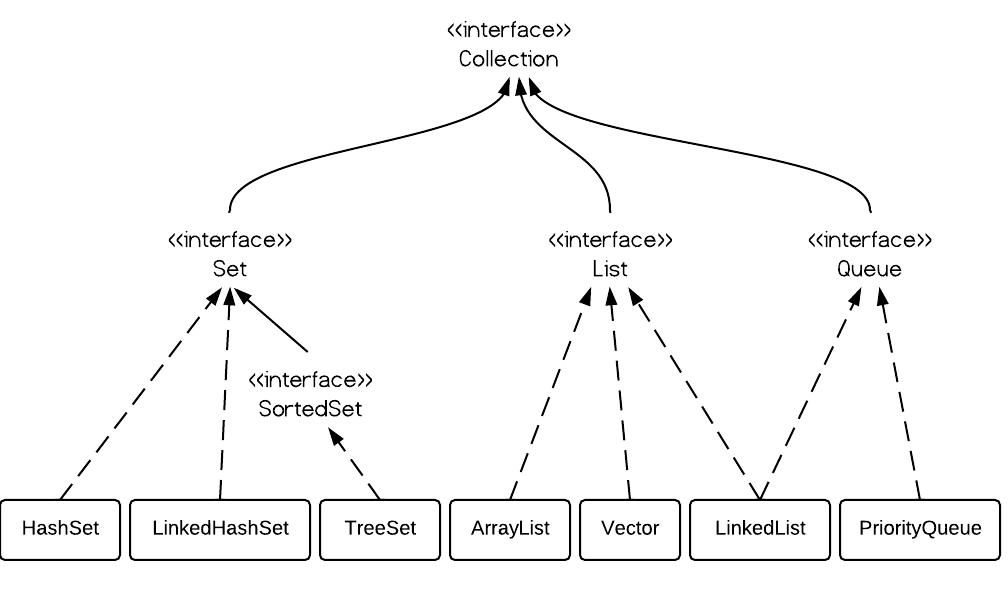
Can Jackson Deserialize Java Time ZonedDateTime

Yes, but must include JSR310. Thus ZonedDateTime can be deserialized directly from JSON response to POJO field. <dependency> <g...